
Bag Count with Multiple Bag Vend Options
For machines with a button to vend more than 1 bag for a single price e.g. Vend 3 bags for $10 the bag count will be decremented by the number of bags vended.
Similarly if your machine uses the same Bag as a multilevel bag for Small & Large Bag vends this functionality can be used to reduce the number of bags for either a small or large vend.
This requires, you the user, to configure this under the Settings- Machine - Edit options.
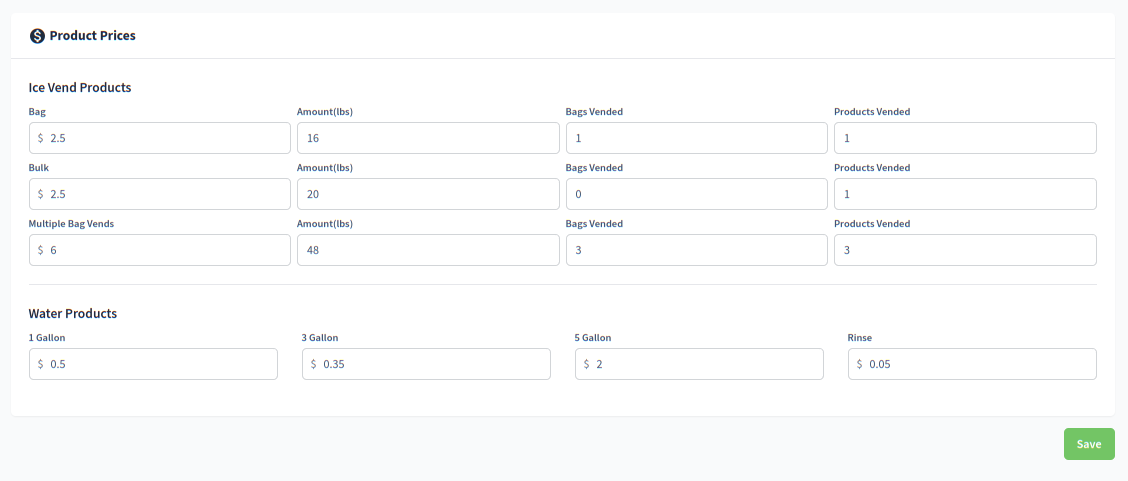
While setting the Weight is optional the number of Bags Vended will decrement the bag count.
The Products Vended will increment the Bags Vend count.
Bulk is set to zero (0) Bags Vended because we do not wish to decrement the bag count with a Bulk vend.
NOTE : If you do not see the options please email us at support@datawrx.com providing details of the machine and the features it has.
In this example the machine has a 3 Bag Multi Vend option
Similarly, for a machine which uses the multilevel bag option you would adjust the Settings as per the following example. Where both the Big Bag and Small Bag consume one Bag.
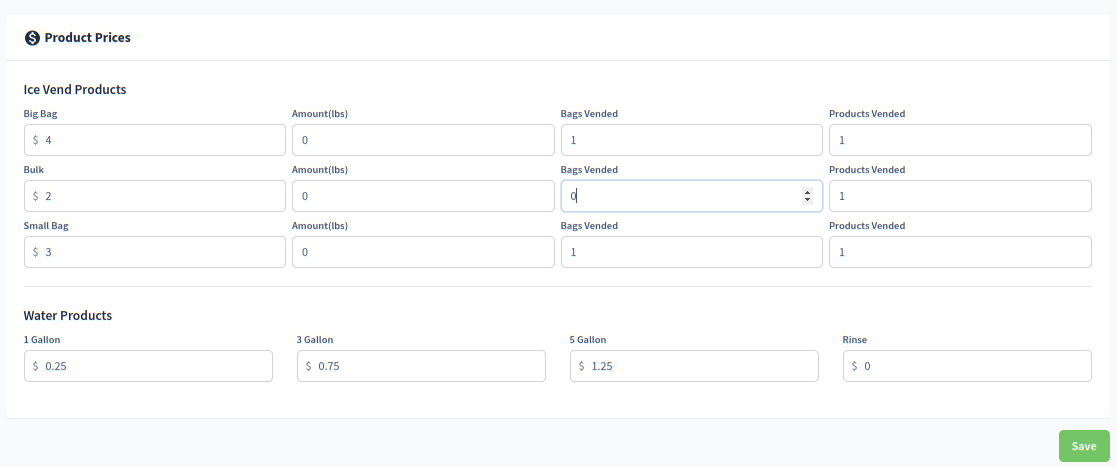
At this time there is no option to track Small Bags separately for machines which use 2 different sizes of bags.
Example: one selection dispenses three bags
If one purchase dispenses three bags, Bags Vended = 3 subtracts three bags from inventory. Products Vended = 3 records three product units for that vend. The transaction and product quantity describe different things.
For a bulk selection that uses no bag, set Bags Vended to zero. Enter the selling price and Amount(lbs) separately; neither replaces the bag-consumption setting. See Monitoring Bag Count and Recording Product Weight.